Fine-tuning Small LLMs with QLoRA: A Practical Beginner Guide
Learn how to practically fine-tune the Qwen2.5-0.5B model on consumer GPUs using QLoRA, handling everything from quantization to avoiding OOM errors.
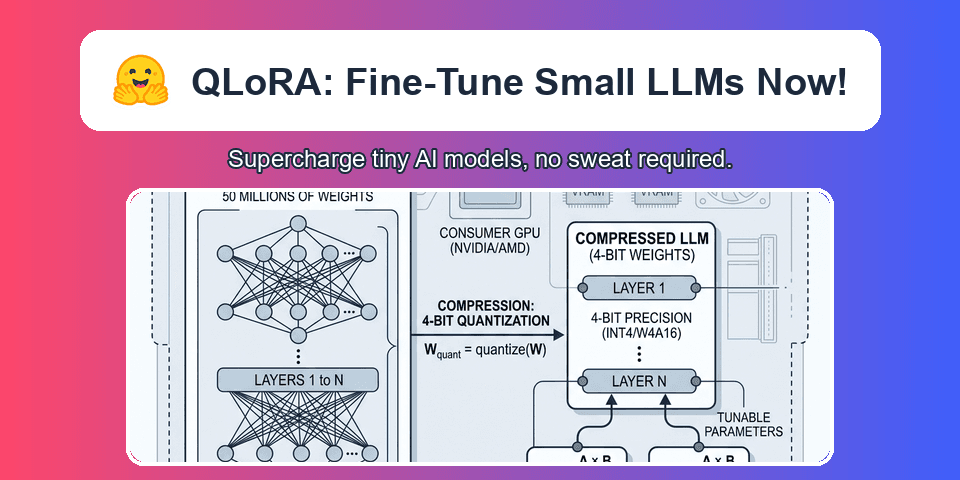
Training massive Large Language Models (LLMs) used to require clusters of enterprise GPUs. Today, you can fine-tune highly capable models locally on consumer hardware. The breakthrough that makes this possible is QLoRA (Quantized Low-Rank Adaptation).
This guide walks through the mechanics of QLoRA and demonstrates a complete, end-to-end workflow fine-tuning the Qwen2.5-0.5B-Instruct model on the mlabonne/FineTome-100k dataset using the standard Hugging Face ecosystem.
The VRAM Bottleneck
Standard full fine-tuning updates every parameter in a model. A 7B parameter model stored in 16-bit precision requires roughly 14GB of VRAM just to sit in memory. During training, optimizer states and gradients quickly push that requirement above 40GB, well beyond the capacity of most consumer GPUs.
QLoRA solves this VRAM bottleneck through a combination of aggressive compression and targeted parameter updates.
[!NOTE] QLoRA is not a single algorithm, but a combination of 4-bit quantization (compressing the base model) and LoRA (training tiny adapter matrices while keeping the base model frozen).
The Math Behind QLoRA Compression
The core of QLoRA is the introduction of a new data type designed specifically for neural networks: 4-bit NormalFloat (NF4). Understanding why NF4 works requires a quick look at the problem with standard uniform quantization.
The Problem with Uniform Quantization (INT4)
Before QLoRA, quantizing weights to 4-bit typically meant using standard INT4. In uniform quantization, the range of possible weights (e.g., from -2.0 to 2.0) is divided into 16 equally spaced bins.
This is mathematically problematic because neural network weights are not distributed uniformly. They overwhelmingly follow a zero-centered normal (Gaussian) distribution. In an INT4 system, the bins far away from zero remain empty, representing a wasted representation. Conversely, the bins near zero are too wide, forcing millions of distinct small weights into the exact same bin, causing massive quantization error.
The Solution: NormalFloat (NF4)
QLoRA uses quantile quantization to create NF4. Instead of equally spacing the bins by value, it spaces them by density using the quantiles of a standard normal distribution .
| Feature | INT4 (Uniform) | NF4 (NormalFloat) |
|---|---|---|
| Bin Spacing | Linear (Equal distance) | Non-linear (Gaussian quantiles) |
| Distribution Assumption | Uniform | Normal (Zero-centered) |
| Quantization Error | High | Information-theoretically optimal |
| Storage Cost | 4 bits per parameter | 4 bits per parameter |
Because NF4 bins are concentrated where the weights actually exist, it preserves the intricate structure of the base model. This allows a 4-bit compressed model to perform nearly on par with a 16-bit uncompressed model. Crucially, the model uncompresses these weights to higher precision (BF16) on the fly during computation, maintaining performance.
Double Quantization
The scaling constants required to translate 4-bit weights back to 16-bit take up memory themselves (about 0.5 bits per parameter). QLoRA applies a second round of quantization to these constants, reducing their footprint to roughly 0.127 bits per parameter. This saves hundreds of megabytes on larger models.
Paged Optimizers
Training involves sudden memory spikes. QLoRA uses NVIDIA unified memory to page optimizer states out to system RAM during these spikes, preventing out-of-memory (OOM) crashes.
How LoRA Adapters Function
With the base model frozen in 4-bit NF4, we need a way to train the network. Enter LoRA.
Instead of modifying the billions of frozen weights, LoRA injects small "adapter" matrices into the transformer architecture (specifically targeting the attention modules).
The weight update is decomposed into two smaller matrices, and : The model output is calculated as:
During backpropagation, gradients only flow into these adapters. Because these adapters represent less than 1% of the total parameter count, the memory required for gradients and the AdamW optimizer drops drastically.
Rank (r) and Alpha
The capacity and influence of these adapters are governed by two primary hyperparameters: Rank () and Alpha ().
To visualize the mathematics, imagine a weight matrix in a 7B model with dimensions 4096 4096. A full update would require tracking 16,777,216 parameters for that single layer. By using LoRA with a rank , we decompose this into matrix A (4096 16) and matrix B (16 4096). The total trainable parameters drop to just 131,072—a 99% reduction.
| Parameter | Mathematical Role | Impact on Trainable Parameters | Impact on VRAM |
|---|---|---|---|
| Rank () | Sets the inner dimension of matrices A and B | Scales linearly (e.g., has twice the parameters of ) | Negligible |
| Alpha () | A constant scalar () adjusting adapter influence | Zero impact | Zero impact |
A critical misconception is that raising rank from 16 to 128 will cause an Out-Of-Memory (OOM) error. In reality, the trainable parameters remain a tiny fraction of the total model size. VRAM exhaustion during training is almost entirely driven by batch sizes, sequence lengths, and optimizer states, not the adapter rank. However, a higher rank does increase the risk of overfitting if your dataset is small, as the adapters have more capacity to memorize the training data rather than generalize.
The Model and Dataset
For this practical workflow, we use a lightweight, efficient setup perfectly suited for learning and experimentation on local hardware.
The Model: Qwen2.5-0.5B-Instruct
The Qwen2.5-0.5B-Instruct model is a dense, decoder-only Transformer. Despite its tiny size, it incorporates modern architectural features that make it highly performant and efficient to fine-tune.
| Specification | Exact Value | Significance for Fine-Tuning |
|---|---|---|
| Total Parameters | 0.49 Billion | Easily fits into 4-bit VRAM limits (<1GB). |
| Layers | 24 | Deep enough to learn complex, non-trivial patterns. |
| Attention Mechanism | Grouped-Query Attention (GQA) | Reduces KV cache size during inference, saving memory. |
| Q / KV Heads | 14 Query, 2 KV | 1:7 ratio allows highly efficient memory bandwidth usage. |
| Vocabulary Size | 151,643 tokens | Large vocab efficiently compresses multilingual text and code. |
| Context Length | Up to 32,768 tokens | Allows fine-tuning on long-context documents. |
[!TIP] Starting with an
Instructtuned model rather than a base model is recommended if you are fine-tuning for specific structural outputs. The model already understands conversational roles (user,assistant), allowing your fine-tuning to immediately focus on the actual domain knowledge.
The Dataset: FineTome-100k
Dataset quality dictates the success of fine-tuning. FineTome-100k is a highly curated, filtered subset of the larger Arcee The-Tome dataset. It was filtered specifically using the HuggingFaceFW/fineweb-edu-classifier to retain only educational, high-quality exchanges.
| Specification | Value |
|---|---|
| Total Rows | 100,000 |
| Filtering Mechanism | HuggingFaceFW/fineweb-edu-classifier |
| Format Schema | ShareGPT format |
The dataset uses the standard ShareGPT JSON structure. When fine-tuning, the trainer iterates through the conversations array. Crucially, the loss function only calculates gradients on the gpt (assistant) turns, not the human prompts.
1{
2  "conversations": [
3    {
4      "from": "human",
5      "value": "Explain what boolean operators are, and provide examples of how they can be used in programming."
6    },
7    {
8      "from": "gpt",
9      "value": "Boolean operators are logical operators used in programming to manipulate boolean values (true and false). Common operators include AND, OR, and NOT..."
10    }
11  ],
12  "source": "arcee-ai/The-Tome",
13  "score": 0.94
14}
The Data Pipeline
Before gradients are calculated, the trainer transforms this raw text into tokens.
The End-to-End Training Workflow
The modern Hugging Face ecosystem (transformers, peft, trl, bitsandbytes) abstracts away the complex math of QLoRA into a streamlined pipeline.
1. Environment and Library Setup
First, ensure your environment has the necessary libraries. You must be running on a machine with a CUDA-enabled NVIDIA GPU.
1pip install transformers datasets trl peft bitsandbytes torch2. Quantization Configuration
To use NF4 quantization, we define a BitsAndBytesConfig. This tells Hugging Face to load the model directly into 4-bit NF4 format with Double Quantization enabled.
1import torch
2from transformers import AutoModelForCausalLM, AutoTokenizer, BitsAndBytesConfig
3
4model_name = "Qwen/Qwen2.5-0.5B-Instruct"
5
6bnb_config = BitsAndBytesConfig(
7    load_in_4bit=True,
8    bnb_4bit_quant_type="nf4", # The crucial switch from standard int4 to normalfloat
9    bnb_4bit_compute_dtype=torch.bfloat16, # Math is done in 16-bit to prevent precision loss
10    bnb_4bit_use_double_quant=True, # Saves an extra 0.127 bits per parameter
11)
12
13tokenizer = AutoTokenizer.from_pretrained(model_name)
14model = AutoModelForCausalLM.from_pretrained(
15    model_name,
16    quantization_config=bnb_config,
17    device_map="auto"
18)
3. Gradient Checkpointing Setup
Gradient checkpointing trades computation time for memory. Instead of storing all intermediate activations during the forward pass (which causes massive VRAM spikes), it discards them and recalculates them during the backward pass.
When using QLoRA, this requires specific setup to maintain gradient flow into the adapters.
[!CAUTION] If using gradient checkpointing with PEFT, you must explicitly enable input grads, otherwise gradients fail to flow to adapters and your loss will go to zero.
1from peft import prepare_model_for_kbit_training
2
3# 1. Enable checkpointing on the base model
4model.gradient_checkpointing_enable()
5
6# 2. Prepare the model for k-bit training (casts layernorms to fp32)
7model = prepare_model_for_kbit_training(model)
8
9# 3. CRITICAL: Force gradients to flow to the input embeddings
10model.enable_input_require_grads()
11
12# 4. Disable KV cache (incompatible with training)
13model.config.use_cache = False
4. Loading the Dataset
Using the datasets library, we pull the training split. The SFTTrainer will automatically map the ShareGPT conversational format to ChatML if your tokenizer includes a chat template.
1from datasets import load_dataset
2
3dataset = load_dataset("mlabonne/FineTome-100k", split="train")
5. Configuring PEFT (The LoRA Adapters)
We inject the LoRA adapters into the target modules. Targeting all-linear (all linear layers, not just attention) often yields better results for small models, though it uses slightly more memory.
1from peft import LoraConfig
2
3peft_config = LoraConfig(
4    r=16,
5    lora_alpha=32,
6    target_modules="all-linear",
7    lora_dropout=0.05,
8    bias="none",
9    task_type="CAUSAL_LM"
10)
6. Initializing SFTTrainer and Execution
The SFTTrainer handles the complex boilerplate of gradient accumulation, logging, and optimization steps. Because we are only training tiny adapters, we use a learning rate roughly 10x higher than full fine-tuning (e.g., 2e-4).
A critical performance optimization included here is packing=True. Instead of padding hundreds of short conversational turns with useless empty tokens (which wastes massive amounts of compute), sequence packing concatenates multiple short conversations into a single sequence up to the max_seq_length (e.g., 1024). This ensures the GPU is always doing meaningful work, often speeding up training by 300% or more.
1from trl import SFTTrainer, SFTConfig
2
3training_args = SFTConfig(
4    output_dir="./qwen-finetuned",
5    gradient_checkpointing=True, # Must match the model setup
6    per_device_train_batch_size=2,
7    gradient_accumulation_steps=4,
8    learning_rate=2e-4,
9    logging_steps=10,
10    max_seq_length=1024,
11    packing=True, # Packs multiple short sequences into one to speed up training
12    num_train_epochs=1,
13    optim="paged_adamw_8bit", # Pages optimizer states to CPU RAM during spikes
14)
15
16trainer = SFTTrainer(
17    model=model,
18    train_dataset=dataset,
19    peft_config=peft_config,
20    args=training_args,
21)
22
23# Execute the training loop
24trainer.train()
25
26# Save only the lightweight LoRA adapters, not the full model
27trainer.save_model("./qwen-finetuned-adapters")
7. Running Inference
To use your fine-tuned model later, you load the base model and dynamically merge your saved adapter weights on top.
1from peft import PeftModel
2
3# Load the base model natively
4base_model = AutoModelForCausalLM.from_pretrained(model_name, device_map="auto")
5
6# Attach the trained LoRA adapters
7fine_tuned_model = PeftModel.from_pretrained(base_model, "./qwen-finetuned-adapters")
8
9# Inference proceeds as normal
10# generated_ids = fine_tuned_model.generate(...)
Common Pitfalls and Troubleshooting
When training LLMs locally, silent failures and subtle performance degradations are more common than hard crashes.
The Troubleshooting Matrix
| Symptom | Likely Cause | Recommended Fix |
|---|---|---|
| CUDA OOM on first batch | Batch size + Context Length is too large. | Lower per_device_train_batch_size to 1 or 2. Increase gradient_accumulation_steps. |
| CUDA OOM mid-training | Optimizer states expanding. | Ensure you use paged_adamw_8bit and gradient_checkpointing=True. |
| Loss goes to 0 immediately | Chat template mismatch. | Ensure your dataset format is correctly mapped to the tokenizer's expected ChatML format. |
| Model replies with garbage | Missing enable_input_require_grads() | You must explicitly enable input grads when using gradient checkpointing with PEFT. |
Deep Dive: Catastrophic Forgetting
Catastrophic forgetting occurs when your fine-tuning overwrites the model's pre-trained knowledge base. If your model suddenly forgets how to answer general knowledge questions (like "What is the capital of France?") but perfectly outputs your specific JSON schema, it has overfitted to the training task. The gradients from the new task have effectively erased the mathematical pathways defining the original knowledge.
To mitigate this, mix a small amount of general conversational data (e.g., 5-10% of the dataset) back into your specialized training set. This acts as a "replay buffer," reminding the model of its baseline capabilities. Aggressive learning rates accelerate the destruction of base knowledge, so keep the learning rate in check.
Finally, for SFT, 1 to 3 epochs is standard. Training for 10+ epochs on a small dataset almost guarantees catastrophic forgetting. Stop training the moment the validation loss starts to plateau; any further optimization is likely just memorization.
Deep Dive: Double Quantization Degradation
Double quantization saves roughly 0.37 bits per parameter, but it introduces extreme sensitivity into the weights. A common pitfall is the "Re-quantization Loop".
Users will train QLoRA adapters on top of an NF4 base model, merge the adapters into the base model (converting everything back to FP16), and then re-quantize the newly merged FP16 model back down to a 4-bit GGUF format for CPU inference.
This double lossy compression cycle introduces severe artifacts, especially on sub-billion parameter models like Qwen2.5-0.5B, completely degrading the reasoning capability.
[!WARNING] If your final goal is a highly compressed format like GGUF, avoid QLoRA entirely. Instead, fine-tune the model in pure
bfloat16using standard LoRA, merge the adapters at full precision, and then perform a single, clean quantization pass to your target format.
Conclusion
QLoRA democratizes LLM development. By compressing the base model to 4-bit NF4 and selectively training low-rank adapters, you bypass the massive VRAM requirements that previously gated this technology. With a clean dataset and the Hugging Face workflow, custom-tailoring highly capable models like Qwen2.5-0.5B to your specific use case is achievable on hardware you likely already own.
References
Previous Post
Prompt Engineering in 2026: Context, Constraints, and Security
Next Post
The Developer's Guide to LLM Quantization: AWQ, GPTQ, and Memory Trade-offs
If the article helped you in some way, consider giving it a like. This will mean a lot to me. You can download the code related to the post using the download button below.
If you see any bug, have a question for me, or would like to provide feedback, please drop a comment below.